





FinOps, a fusion of Finance and DevOps, is a cloud financial management discipline that fosters collaboration across finance, engineering, IT, and business teams. It aims to maximize the business value of cloud investments through a shared culture of accountability, transparency, and informed decision-making.
Unlike traditional financial management, FinOps is built for the dynamic, pay-as-you-go nature of the cloud. It enables decentralized teams to manage usage while aligning with centralized financial goals.
Core Principles of FinOps
- Cross-functional Collaboration: Finance, technology, and business teams work together to manage and optimize cloud spending.
- Cost Transparency: Everyone gains real-time visibility into cloud usage and associated costs.
- Shared Accountability: All teams take ownership of their cloud consumption.
- Business Value-Driven Decisions: Cloud spend is aligned with strategic business outcomes.
- Timely & Accessible Reporting: Stakeholders receive data when it matters most.
- Embrace Cloud’s Variable Cost Model: Teams capitalize on elasticity to adjust real-time costs.
This article focuses on applying FinOps within Azure environments, helping teams better understand and optimize their cloud costs.
Why FinOps Matters
FinOps empowers organizations to:
- Control Cloud Spend in Real Time: Prevent cost overruns as cloud usage scales.
- Right-size Resource Utilization: Eliminate over-provisioning and underutilized assets.
- Improve Budget Management: Maintain visibility across dynamic cloud environments.
- Demystify Pricing Models: Navigate complex compute, storage, and networking charges.
- Boost ROI & Innovation Capacity: Free up budgets for growth and transformation.
- Enhance Strategic Agility: Make data-informed decisions on resource allocation.
Who Should Embrace FinOps
FinOps is for Azure organizations who want to control, monitor, and reduce their cloud expenses. Key stakeholders include:
- IT leaders and cloud engineers
- Financial controllers and budget owners
- Software vendors and solution architects
FinOps Team Structure
- Core FinOps Team: Develops policies, drives adoption, and manages tooling.
- Cloud Cost Owners: Oversee spending within their departments or projects.
- Finance Team: Ensures fiscal compliance and financial planning.
- Engineering Team: Implements optimization strategies and automation.
Governance and Policies in FinOps
Cloud governance ensures that the proper practices are followed and aligned with business goals. It includes policies (statements of intent) and guardrails (tools, processes, or automation).
Key components include:
- Cost visibility, chargeback/show back
- Budgeting and forecasting
- Risk and compliance monitoring
- Preferred and restricted service definitions
- Data retention and storage lifecycle policies
- Technology modernization and architectural alignment
- Ongoing automated policy compliance reviews
Building a FinOps Culture
At its heart, FinOps is a cultural transformation, from traditional data center mindsets to cloud-native agility. This shift requires:
- Clear ownership and governance
- Transparent communication
- Consistent reinforcement of cost accountability
- Embedded policies to sustain behavioral change
Tools and Techniques for Implementing FinOps on Azure
FinOps professionals leverage a wide range of tools and techniques to meet key objectives, including:
- Strategic cost optimization
- Real-time monitoring and alerting
- Accurate cost allocation and insightful reporting
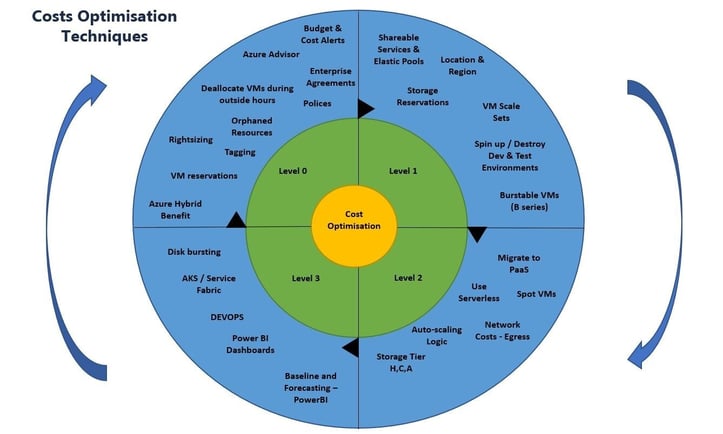
To implement FinOps effectively on Azure, organizations can adopt a phased approach that aligns with their cloud maturity and business priorities. Below is a structured collection of tools and techniques to guide this journey:
| Tools and Technologies | Description |
|---|---|
| Azure Pricing Calculator | Analyze various combinations of Azure services to optimize the Azure resource configuration. Use the Azure pricing calculator to decide the right size for the service, considering configuration, tier, volume, capacity, etc. |
| Azure Advisor |
Azure Advisor offers actionable recommendations to help optimize Azure resources for reliability, security, operational excellence, performance, reduce costs, and increase the efficiency of cloud investments. |
| On-Demand Capacity Reservation |
Enables the reservation of compute capacity in an Azure region or an Availability Zone for any duration of time without any commitment |
| Spot VMs |
Buy unused compute capacity at significant cost savings. Azure Spot Virtual Machines are great for workloads that can handle interruptions, such as batch processing jobs, dev/test environments, large compute workloads, and more. |
| Azure Reservations |
Help save money by committing to one-year or three-year plans for multiple products. Save on Azure database services by pre-committing to fully managed services. |
| Software Plans |
Azure software plans for SUSE and RedHat are reservations that apply to VMs. The software plan discount applies to the software usage of deployed virtual machines that match the reservation. |
| Azure Hybrid Benefit Savings Calculator (Licensing benefit) |
Estimates the price, savings, and eligible instances in Azure based on the organization’s current Software Assurance licenses. This enables organizations to use their existing licenses, provisioning Azure services to avoid duplicate license costs (Windows VMs, SQL Server etc.) |
| Serverless Computing |
Serverless computing allows running code without the need to provision or manage servers. This can result in significant cost savings, only paying for the resources in use. Azure offers several serverless options, including Azure Functions, Logic Apps, and Event Grid. |
| TCO Calculator (Total Cost of Ownership) |
Estimate the cost savings one can realize by migrating workloads to Azure. |
| Saving Plans |
Committing an hourly spend for Azure compute resources for a one-year or three-year plan. |
| FinOps toolkit |
Includes scripts and solutions to accelerate the Azure FinOps journey |
|
Region Selection |
Azure has multiple regions in a geography. Choose Azure resources that are cheaper in the business operational geography. For e.g., storage services are generally more affordable in us-east-2 than us-east |
| Cut out waste |
A Workbook to identify resources that are no longer in use. The workbook provides an overview of orphaned resources, enabling teams to enhance efficiency by:
|
| Resource Locks |
Resource Locks prevent the accidental deletion or modification of Azure resources. This can help avoid unexpected costs due to human error. By applying a Resource Lock to a resource, the team can prevent it from being deleted or modified without an explicit override. |
|
Automate |
Use automation to
|
|
3rd Party Solutions |
Use a third-party toolset to correct the cloud infrastructure. Some of these are
|
| Dev/Test pricing |
Significantly reduce the costs of ongoing dev/test workloads with discounted rates on Azure services by using the Dev/Test environment instead of production for lower environments. |
| Optimize Lower Environments Usage |
Remove costly services not required for lower environments, such as Defender for Storage (file scans), DDoS, Defender, etc.
|
|
Adopt Multi-Cloud Strategy |
Evaluate and apply a multi-cloud based on where it is cheaper without affecting the business goals. |
|
Use Artificial Intelligence |
Use Custom, freely available, or commercial, ready-to-use AI/ML solutions for the following. Add their output to the dashboard.
We can train ML models on historical spending data, including multiple Azure accounts. This diverse dataset allows the model to train complex relationships and produce more reliable predictions. |
|
Optimize Networking Costs |
Resource sizing
Traffic routing
Reserved instances Purchase reserved instances for predictable network traffic to get significant cost discounts. Cost management tools
Data transfer optimization
Cost-effective options
|
|
Resource-specific optimization |
The following are some additional resource-specific recommendations.
|
| Azure Cost Management |
Build a dashboard to monitor and raise alerts for preemptive care.
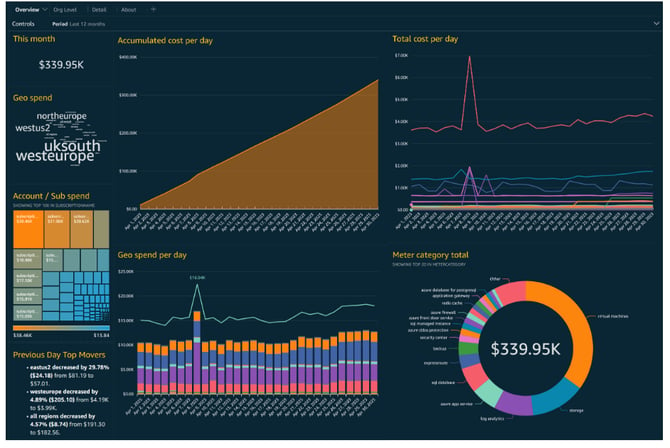
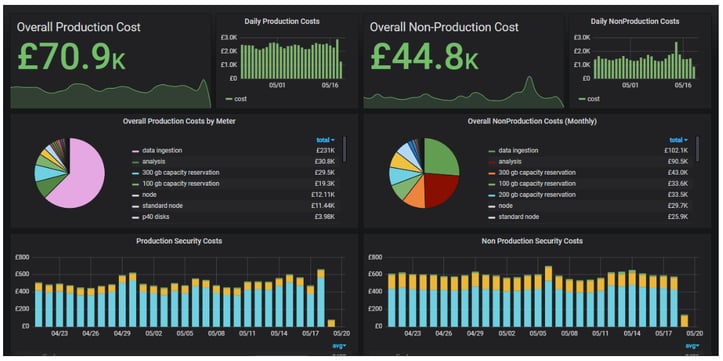
The objective is to have Comprehensive Cost visibility and alerting as a centralized source of truth in a single pane view that users can drill down to the details. |
Here are some reference dashboards:
Summary View
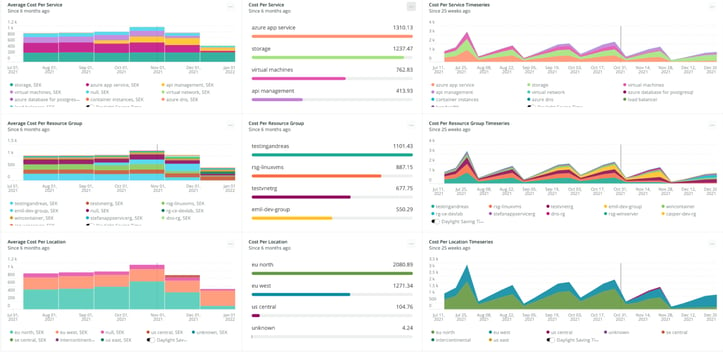
Detail View
Predictive Analytics: While Azure Cost Management visualizes spending patterns, its predictive capabilities are limited. For more accurate forecasting and a deeper understanding of cloud spending trends, we can leverage Azure Machine Learning to build custom machine learning models. The key is training these models on various historical data, particularly from multiple Azure accounts. This diverse dataset allows the model to train complex relationships and produce more reliable predictions across different environments and workloads.
Summary
FinOps aims to align an organization’s cloud expenditure with business objectives while balancing cost optimization, performance, and maximizing the efficiency of their cloud usage to get the most value out of their cloud investments and increase their overall competitiveness. Here, everyone takes ownership of their cloud usage, supported by a central best-practices group.